Microsoft SkyDrive is an awesome service and the recently released
desktop synchronisation application makes keeping all of your files with
you and up-to-date a breeze.
When you first install SkyDrive it prompts you to select the folder
location in which to store your files. But what happens if you want to
change that location down the track? The application itself doesn’t
currently have that functionality (i.e. until Windows 8.1 was released!).
More on http://maxshifman.com/2012/08/move-microsoft-skydrive-folder-location-without-re-downloading-all-files/?q=2012/08/30/move-microsoft-skydrive-folder-location-without-re-downloading-all-files/
Showing posts with label SkyDrive. Show all posts
Showing posts with label SkyDrive. Show all posts

Subscribe to:
Posts (Atom)
Nvidia's GauGan App
NVIDIA's GauGAN AI Machine Learning Tool creates photorealistic images from Simple Hand Doodling http://nvidia-research-mingyuliu.com/...
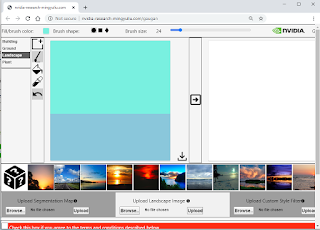
-
Code Snippet Index Page (from KTM Wiki) A Access DPI Access an External Database Active Page Index Add a Word Add an Alternative ...
-
 In einem Blog auf ZDNet.com werden die aktuellen technologischen Trends sehr gut dargestellt. http://www.zdnet.com/article/the-enterpri...
-
Windows has with netsh command very useful instruments to enable a laptop or desktop WLAN hotspot to share internet access with tablets, sma...