2.7.20

6.3.19

Robotics and Automation

John Oliver summarizes very accurate and to the point, how our new generation should prepare themselves for the future: in a world full of optimizations, automation, robotics, where humans can not compete and will (probably) not be needed as workforce!

But they should possess following three qualifications, in order to be able to survive:

  • Non-routine tasks that require Social Intelligence
  • Complex Critical Thinking
  • Creative Problem Solving


Last Week Tonight with John Oliver (HBO)

Another RPA Vendor releases Community Edition

One of the major RPA vendors, Automation Anywhere releases a Community Edition for free:


To have access to cloud based application and to download the client component of the Community Edition you need to register under the following link:

https://www.automationanywhere.com/lp/rpa-editions-comparison

7.11.17

Microsoft Free Ebooks

Here are two links with Microsoft's free Ebook links:

Largest FREE Microsoft eBook Giveaway: Microsoft eBooks from Eric Ligman (Microsoft Director of Business & Sales Opreations)

https://blogs.msdn.microsoft.com/mssmallbiz/2017/07/11/largest-free-microsoft-ebook-giveaway-im-giving-away-millions-of-free-microsoft-ebooks-again-including-windows-10-office-365-office-2016-power-bi-azure-windows-8-1-office-2013-sharepo/


The second link is from Microsoft Virtual Academy with free eBooks from Microsoft Press:

https://mva.microsoft.com/ebooks#


How to run Lego Boost on an Android Phone

Lego Boost is the new "creative toolbox" from Lego for kids (Lego NXT is designed for ages greater than 14, whereas Lego Boost was labeled for ages "7-12") to build robots which comes with a set of 5 models to be built.
According to official information, you need to have an Android tablet or an iPad in order to run Lego Boost app (and also Kindle, but there is no Windows application, yet). And this app works only after Android version v5.x.

But what to do, if you have only an Android phone? Well, you cannot donwload Lego Boost app from Google's Playsore ("This device is not supported").
If you try to download Lego Boost apk file from APK-downloader sides, it won't run on your phone..

But there is a way to overcome this: APKPure


APKPure's app enables to run XAPK files, which you can download also from their website.

After installing APKPure on your Android phone, search for Lego Boost and download XAPK file:


You can also download APK files, and older versions if you scroll down:


Now you can run Lego Boost from Android phone without any restriction (well, on an 5.5" screen a bit tight but makes fun working with it)

14.10.17

Integrating PyGame into 64-Bit Portable (Win-) Python

If you download the PyGame installation files (from http://www.pygame.org/download.shtml) for the WinPython 64-Bit edition, it is likely that you get following error messages:


According to the following Stackoverflow article, the 32-Bit PyGame libraries are causing such problems, and they need to be replaced by the 64-Bit versions, which are maintained under following website: http://www.lfd.uci.edu/~gohlke/pythonlibs/#pygame
(amongst them is the PyGame)


The files are listed on this website as "*.whl" files, which are in fact ZIP files and can be opened by 7-Zip.


The subfolder "pygame-1.9.3.data" contains all header files, which need to be copied to the "include" folder of WinPython portable installation:


The subfolders "pygame" and "pygame-1.9.3.dist-info" subfolders are needed to be copied to "..\Lib\site-packages" folder:


After copying the folders to the appropriate directories, you can check it with "import pygame" in Python Shell (which does not necessarily needed to be restarted).
If everything goes well, Python Shell could correctly import the PyGame libraries and you can work with it.

9.10.17

Kompetenzenatlas

Eine übersichtliche Darstellung der Kompotenzen mit Links und weitere Erklärungen in einer Matrix-Struktur.

http://kompetenzatlas.fh-wien.ac.at/?page_id=1096

Kompetenzenatlas

24.10.14

Using keywords to refine a windows explorer search

If you want to filter on a property that doesn't appear when you click in the search box, you can use special keywords. This typically involves typing a property name followed by a colon, sometimes an operator, and then a value. The keywords aren't case sensitive. 


Example search term Use this to find
System.FileName:~<"notes"
Files whose names begin with "notes." The < means "begins with."
System.FileName:="quarterly report"
Files named "quarterly report." The = means "matches exactly."
System.FileName:~="pro"
Files whose names contain the word "pro" or the characters pro as part of another word (such as "process" or "procedure"). The ~= means "contains."
System.Kind:<> picture
Files that aren't pictures. The <> means "is not."
System.DateModified:05/25/2010
Files that were modified on that date. You can also type "System.DateModified:2010" to find files changed at any time during that year.
System.Author:~!"herb"
Files whose authors don't have "herb" in their name. The ~! means "doesn't contain."
System.Keywords:"sunset"
Files that are tagged with the word sunset.

System.Size: <1mb
Files that are less than 1 MB in size.

System.Size: > 1gb
Files that are more than 1 GB in size.

Link: http://windows.microsoft.com/en-us/windows7/advanced-tips-for-searching-in-windows

23.10.14

Emulierter Raspberry Pi unter Windows

Mit dem Emulator-Paket für Windows kann man ohne Installation, Konfiguration und Anstöpseleien weiterer Hardware sofort erste Schritte in der Welt des Raspberry Pi unternehmen – ohne tiefer gehende Linux-Kenntnisse. Dazu genügt es für den Anfang, das Archiv zu entpacken und die Datei start.bat auszuführen. Der Emulator Qemu öffnet ein Fenster und startet das Raspberry-Image (Raspbian). Im Fenster lässt sich der Bootvorgang des Pi verfolgen – etwaige Fehlermeldungen kann man getrost ignorieren. Das Hochfahren nimmt einige Zeit in Anspruch, der emulierte Pi läuft selbst auf schnellen Rechnern sogar etwas langsamer als ein echter Raspberry.  

Heise.de Link

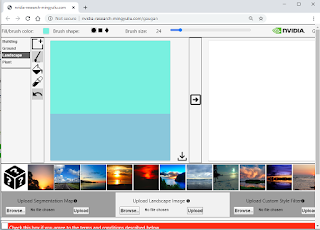
Nvidia's GauGan App

NVIDIA's GauGAN AI Machine Learning Tool creates photorealistic images from Simple Hand Doodling http://nvidia-research-mingyuliu.com/...